
- “Epson LQ-310 Dot Matrix Printer” already exists in your wishlist
Out Of Stock
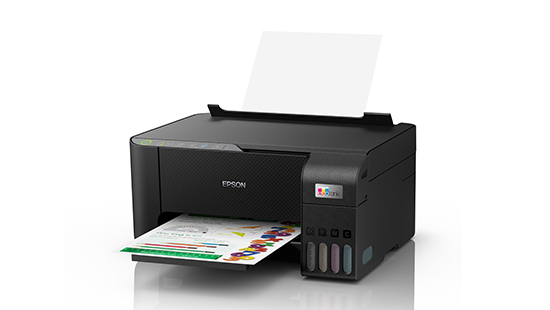
Epson L3250 AIO WIFI PRINTER (Print, Copy, Scan)
RM510.00 Save:RM40.00(7%)
Out of stock
- Print, Scan & Copy
- ISO Standard print speed (A4): Up to 33.0 ppm / 15.0 ppm*2
- Photo Speed :Approx. 69 sec per photo (Border) / 90 sec per photo (Borderless)*2
- Wirelessly print
- Capable to print 4,500 pages for black-and-white, and 7,500 pages for colour
FAQ
Frequently Asked Questions about the Epson L3250 AIO WIFI PRINTER (Print, Copy, Scan)
What are the features of the Epson L3250 AIO WIFI PRINTER (Print, Copy, Scan)?
- Print, Scan & Copy
- ISO Standard print speed (A4): Up to 33.0 ppm / 15.0 ppm*2
- Photo Speed :Approx. 69 sec per photo (Border) / 90 sec per photo (Borderless)*2
- Wirelessly print
- Capable to print 4,500 pages for black-and-white, and 7,500 pages for colour
How much does the Epson L3250 AIO WIFI PRINTER (Print, Copy, Scan) cost?
The normal price is RM550.00, but it is currently on sale for RM510.00. You save RM40.00 (7% off)!
How much is the shipping fee for the Epson L3250 AIO WIFI PRINTER (Print, Copy, Scan)?
Shipping fees depend on your location and order size. Standard shipping within Peninsular Malaysia starts from RM20.
How long does delivery take for the Epson L3250 AIO WIFI PRINTER (Print, Copy, Scan)?
For ready-stock items, delivery within Peninsular Malaysia typically takes 2-4 working days. Deliveries to East Malaysia generally take 5-10 working days. Feel free to browse our full shop catalog for more ready-stock hardware.
Can I collect my order in person?
Please contact us to arrange for self-collection if available. WhatsApp 011-5682 2590 for details.
What payment methods do you accept for the Epson L3250 AIO WIFI PRINTER (Print, Copy, Scan)?
We accept all major credit cards, FPX online banking (Maybank, CIMB, Public Bank, RHB, etc.), and direct corporate invoicing for B2B clients.
Does the Epson L3250 AIO WIFI PRINTER (Print, Copy, Scan) come with a warranty?
Yes, all IT hardware and electronics sold by TiraTech come with an official manufacturer warranty. Please keep your invoice as proof of purchase for any future warranty claims.
Can I extend the warranty?
Extended warranty options may be available for certain products. Contact us for details.
Is the Epson L3250 AIO WIFI PRINTER (Print, Copy, Scan) 100% original and brand new?
Yes, absolutely. All items sold at TiraTech, including the Epson L3250 AIO WIFI PRINTER (Print, Copy, Scan), are 100% genuine, brand new, and sourced strictly from official local distributors. An official invoice will also be provided with your purchase.
Can you provide customized solutions for our company?
Yes, we can tailor IT solutions based on your business needs. WhatsApp us or visit our Corporate Sales page.
Can I request a quotation for bulk orders of the Epson L3250 AIO WIFI PRINTER (Print, Copy, Scan)?
Absolutely. We specialize in B2B IT procurement. If you need a larger quantity or an official quotation, please visit our Corporate Sales page or WhatsApp us directly.
How can I contact TiraTech for this product Epson L3250 AIO WIFI PRINTER (Print, Copy, Scan)?
You can reach our team via:
- WhatsApp: 011-5682 2590
- Email: contact@tiratech.com.my
- Website: Contact Us page
Warranty
Manufacturer's Warranty
Steps to Claim Epson Warranty
1. Check Your Warranty Coverage
Before initiating a claim, verify your product's warranty status. Locate your product's Serial Number and enter it into the official Epson Warranty Status portal.
2. Prepare Your Information
To ensure a smooth process, have the following ready:
- Your device's Serial Number.
- Proof of Purchase: A valid purchase invoice.
- A clear description of the issue.
3. Register Your Product (Recommended)
Registering your product via the MyEpson Customer Portal helps protect your device and gets you expert support. For peace of mind, registering your product can also provide an additional 3 months of warranty.
4. Contact Epson Support Malaysia
Reach out to Epson's helpdesk to determine the exact next steps for your specific product:
- Epson Helpdesk: Call 1800-81-7349 for more information and to initiate a claim.
- Online Inquiry: Submit a question or request directly to the support team through the official Epson Malaysia website.
5. Service Methods
Service procedures depend on the type of Epson product you own and its warranty terms:
- Carry-In Service: For most standard home printers, projectors, and scanners, you will be directed to bring your device to an official Service Center Location.
Important Warranty Information
- Voiding the Warranty: The warranty may be voided if the product is damaged by improper use, unauthorized modification, or the use of non-genuine Epson consumables.
Disclaimer: The warranty information provided above is for reference purposes only. Warranty terms vary by region and specific product model. Always refer to Epson’s official website or speak to an authorized agent for the most accurate and up-to-date information.






 No products in the cart.
Reviews
There are no reviews yet.