
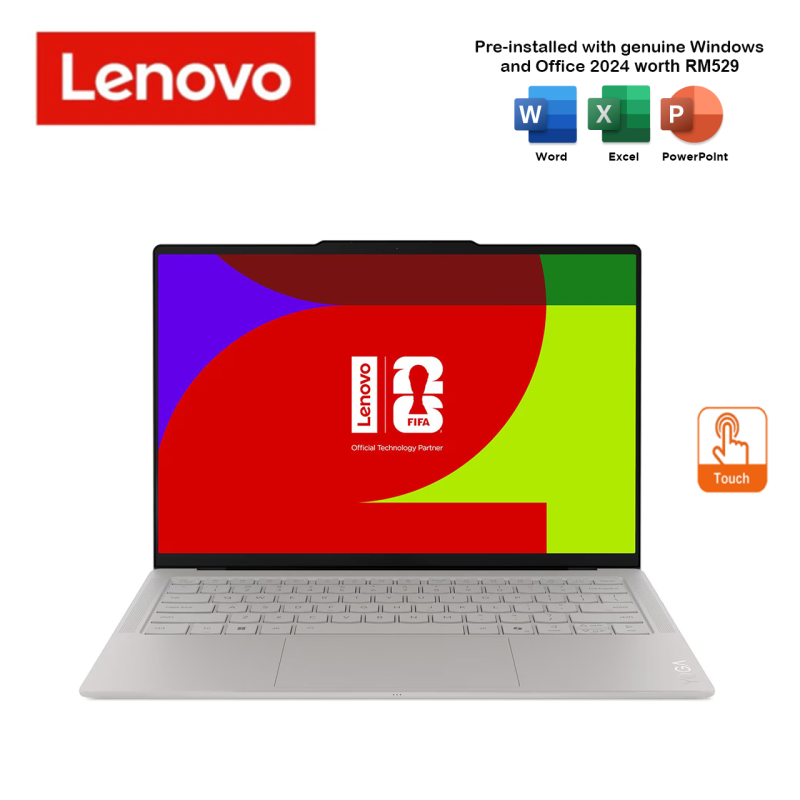
Lenovo Yoga Slim 7 Ultra 14IPH11 83QK004JMJ 14″ 2.8K WQXGA+ Touch Laptop
RM8,039.00
Available in stock
- Seashell
- Intel Core™ Ultra 7 355 Processor
- 32GB Soldered LPDDR5X-7467 RAM
- 1TB SSD M.2 2242 PCIe® 4.0x4 NVMe®
- Integrated Intel® Graphics
- 14" 2.8K WQXGA+ (2880x1800) POLED 1100nits (peak), Anti-fingerprint, 100% sRGB, 120Hz, Touchscreen
FAQ
Frequently Asked Questions about the Lenovo Yoga Slim 7 Ultra 14IPH11 83QK004JMJ 14" 2.8K WQXGA+ Touch Laptop
What are the features of the Lenovo Yoga Slim 7 Ultra 14IPH11 83QK004JMJ 14" 2.8K WQXGA+ Touch Laptop?
- Seashell
- Intel Core™ Ultra 7 355 Processor
- 32GB Soldered LPDDR5X-7467 RAM
- 1TB SSD M.2 2242 PCIe® 4.0×4 NVMe®
- Integrated Intel® Graphics
- 14″ 2.8K WQXGA+ (2880×1800) POLED 1100nits (peak), Anti-fingerprint, 100% sRGB, 120Hz, Touchscreen
How much does the Lenovo Yoga Slim 7 Ultra 14IPH11 83QK004JMJ 14" 2.8K WQXGA+ Touch Laptop cost?
The current price for the Lenovo Yoga Slim 7 Ultra 14IPH11 83QK004JMJ 14" 2.8K WQXGA+ Touch Laptop is RM8,039.00.
How much is the shipping fee for the Lenovo Yoga Slim 7 Ultra 14IPH11 83QK004JMJ 14" 2.8K WQXGA+ Touch Laptop?
Shipping fees depend on your location and order size. Standard shipping within Peninsular Malaysia starts from RM20.
How long does delivery take for the Lenovo Yoga Slim 7 Ultra 14IPH11 83QK004JMJ 14" 2.8K WQXGA+ Touch Laptop?
For ready-stock items, delivery within Peninsular Malaysia typically takes 2-4 working days. Deliveries to East Malaysia generally take 5-10 working days. Feel free to browse our full shop catalog for more ready-stock hardware.
Can I collect my order in person?
Please contact us to arrange for self-collection if available. WhatsApp 011-5682 2590 for details.
What payment methods do you accept for the Lenovo Yoga Slim 7 Ultra 14IPH11 83QK004JMJ 14" 2.8K WQXGA+ Touch Laptop?
We accept all major credit cards, FPX online banking (Maybank, CIMB, Public Bank, RHB, etc.), and direct corporate invoicing for B2B clients.
Does the Lenovo Yoga Slim 7 Ultra 14IPH11 83QK004JMJ 14" 2.8K WQXGA+ Touch Laptop come with a warranty?
Yes, all IT hardware and electronics sold by TiraTech come with an official manufacturer warranty. Please keep your invoice as proof of purchase for any future warranty claims.
Can I extend the warranty?
Extended warranty options may be available for certain products. Contact us for details.
Is the Lenovo Yoga Slim 7 Ultra 14IPH11 83QK004JMJ 14" 2.8K WQXGA+ Touch Laptop 100% original and brand new?
Yes, absolutely. All items sold at TiraTech, including the Lenovo Yoga Slim 7 Ultra 14IPH11 83QK004JMJ 14" 2.8K WQXGA+ Touch Laptop, are 100% genuine, brand new, and sourced strictly from official local distributors. An official invoice will also be provided with your purchase.
Can you provide customized solutions for our company?
Yes, we can tailor IT solutions based on your business needs. WhatsApp us or visit our Corporate Sales page.
Can I request a quotation for bulk orders of the Lenovo Yoga Slim 7 Ultra 14IPH11 83QK004JMJ 14" 2.8K WQXGA+ Touch Laptop?
Absolutely. We specialize in B2B IT procurement. If you need a larger quantity or an official quotation, please visit our Corporate Sales page or WhatsApp us directly.
How can I contact TiraTech for this product Lenovo Yoga Slim 7 Ultra 14IPH11 83QK004JMJ 14" 2.8K WQXGA+ Touch Laptop?
You can reach our team via:
- WhatsApp: 011-5682 2590
- Email: contact@tiratech.com.my
- Website: Contact Us page
Warranty
Manufacturer's Warranty
Steps to Claim Lenovo Warranty
1. Check Your Warranty Coverage
Before initiating a claim, verify your product's warranty status. Locate your device's Serial Number (S/N) and Machine Type Model (MTM) (usually found on a printed label on the bottom or back of the unit). Enter the serial number into the official Lenovo Warranty Lookup portal to confirm your coverage.
2. Prepare Your Information
To ensure a smooth process, have the following ready:
- Your device's Serial Number and Machine Type Model.
- Proof of Purchase: A valid purchase invoice. If the warranty start date in Lenovo's system does not match your actual purchase date, you will need to submit this invoice to request a base warranty adjustment.
- A clear description of the issue.
3. Run Diagnostics via Lenovo Vantage (Recommended)
If your computer is functional, Lenovo recommends running system diagnostics through the Lenovo Vantage app (pre-installed on consumer Windows devices) or Lenovo Commercial Vantage (for ThinkPad/business devices). This tool can automatically detect hardware failures and provide specific error codes to significantly speed up the support and parts replacement process.
4. Contact Lenovo Support Malaysia
Reach out to Lenovo's technical support team to log a service request. The contact methods available depend heavily on your specific device and warranty tier (e.g., Premium Care, Premier Support, or Standard Warranty):
- Online Support Portal: Visit the Lenovo Contact Us page and enter your Serial Number. The system will automatically route you to the correct direct phone numbers, WhatsApp support, Live Chat, or eTicket submission form assigned to your specific device.
- Premium Care / Premier Support: If your device includes these upgraded warranty tiers, entering your serial number will unlock access to dedicated, priority routing support hotlines.
5. Service Methods
Service procedures depend strictly on the warranty tier attached to your Lenovo product:
- On-Site Service: For devices covered by On-Site warranty, Premium Care, or Premier Support, Lenovo will dispatch a certified technician to your location after remote troubleshooting is completed.
- Carry-In / Depot Service: For standard base warranties, you may be directed to drop off the device at a Lenovo Authorized Service Provider.
Important Warranty Information
- Customer Replaceable Units (CRUs): For certain easily replaceable parts (like power adapters, memory, or specific batteries), Lenovo may ship the replacement part directly to you for self-installation without requiring a technician.
- Voiding the Warranty: The standard limited hardware warranty strictly does not cover damage caused by physical accidents, liquid spills, electrical surges, or unauthorized modifications.
- Accidental Damage Protection (ADP): If you purchased Lenovo ADP as an add-on or if it was bundled with your unit, your device may be covered for non-intentional operational or structural failures caused by drops, spills, or surges. Inform the support agent immediately if this applies to your unit.
Disclaimer: The warranty information provided above is for reference purposes only. Specific coverage parameters and claim procedures vary heavily by Lenovo product line and specific service contracts. Always refer to Lenovo’s official website or speak to an authorized agent for the most accurate and up-to-date information.





 No products in the cart.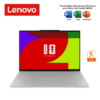
Reviews
There are no reviews yet.